Shawnee County Court Case Search helps users quickly find court case information online. This tool allows people to check case statuses, filing dates, and hearing schedules. It saves time by providing official records without visiting the courthouse. Anyone involved in legal matters can use it to stay informed.
Shawnee County Court Case Search also supports attorneys, businesses, and residents who need accurate case updates. Users can perform a Shawnee County case lookup using names or case numbers. The system displays detailed information for civil, criminal, probate, and traffic cases. This online access keeps court information transparent and reliable.
How to Search Your Shawnee County Court Case Online
The Shawnee County Court Case Lookup allows anyone to check case details online quickly using the official Kansas District Court Public Access Portal. By using this tool, users can view case status, hearing dates, and filing information without visiting the courthouse.
This section provides a complete, step-by-step guide for searching Shawnee County cases efficiently. It covers search by case number, party name, and other filters, ensuring accurate results every time.
Official Portal Access
All searches must be conducted through the official portal:
Kansas District Court Public Access Portal: https://casesearch.kscourts.gov/Home
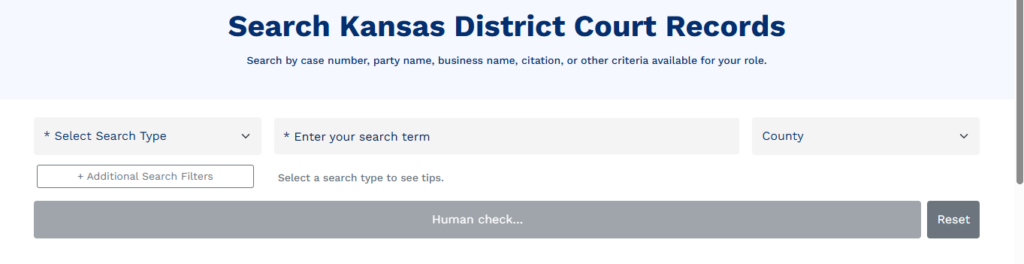
- Open the link in a browser.
- Read the user agreement and click “Accept” to continue.
- Select Shawnee County from the county dropdown to limit results.
Once the portal is open, users can choose the type of search: case number, party name, citation number, or filters.
Search by Case Number
Searching by case number is the fastest way to retrieve specific records.
Where to Find Case Numbers
- Case numbers are on official court documents, summons, or legal notices.
- They typically follow this format:
YYYYCV#####for civil cases,YYYYCR#####for criminal cases, or other codes depending on case type.
How to Enter a Case Number
- On the portal, select Case Number as the search type.
- Type the full case number exactly as it appears on your documents.
- Click Search.
Tips for Accurate Results
- Ensure all digits and letters match the official case number.
- Use hyphens or spaces only if they appear in the official number.
- This method returns precise results instantly.
Why Case Number Search Works Best
- It avoids ambiguous results caused by common names.
- It is the most reliable way to access court records for attorneys, businesses, or individuals.
- Users can view case type, filing date, parties, hearing schedule, and case status immediately.
Search by Party Name
If the case number is unknown, a party name search allows users to find cases using names.
How to Search by Party Name
- Select Party Name on the search form.
- Enter the last name of the person or business first.
- Add a first name or middle initial to narrow results.
- Use nicknames or known aliases cautiously.
Wildcard and Partial Searches
- Using an asterisk
*allows partial name searches (e.g.,John*finds John, Johnson, or Johnston). - This is useful when the exact spelling is uncertain.
Tips for Better Results
- Always select Shawnee County to limit irrelevant results.
- Double-check spelling and avoid unnecessary punctuation.
- Combine first and last name for more precise results.
What You Can See
A party name search returns a list of matching cases, including:
- Case numbers
- Filing dates
- Case types (civil, criminal, traffic, probate)
- Case status and scheduled hearings
This is ideal for users who only know the parties involved but not the case number.
Search by Other Filters (Citation, File Date, Case Type)
The portal also provides optional filters to refine your search:
- Citation Number – Use for traffic tickets or minor citations.
- File Date – Narrow results by filing period (month/year).
- Case Type – Limit searches to civil, criminal, probate, domestic, or traffic cases.
How to Use Filters
- Enter the relevant filter criteria in the portal fields.
- Combine filters for more accurate results. For example, file date + case type.
- Click Search to view filtered results.
Filters are useful when multiple cases match a name or partial information. They help reduce irrelevant results and improve accuracy.
Important Notes About Search Limitations
- Sealed Cases – Cannot be accessed online.
- Juvenile Cases – Restricted to protect minors.
- Certain Adoption or Family Records – Only available through the court clerk.
For restricted records, users must contact the Shawnee County District Court Clerk for assistance.
What Is the Kansas District Court?
The Kansas District Court is the state trial court where most legal cases begin. It handles a wide range of matters, including civil disputes, criminal cases, traffic violations, and probate issues. Each county in Kansas, including Shawnee County, has its own district court, which is part of the statewide system.
A central tool for finding case information online is the Kansas District Court Public Access Portal, a system that allows anyone to perform a Shawnee County case lookup and view publicly available case records. The portal collects data from the statewide court system, giving users a single place to search records across counties.
Kansas District Court Public Access Portal
The Kansas District Court Public Access Portal is an online interface where users can search for publicly available case information. It allows searches by case number, party name, citation number, and other criteria, providing access without a courthouse visit.
Once users accept the portal’s terms, they can search Shawnee County cases as part of the statewide case database. The portal typically displays:
- Case number format and case type
- Names of parties involved
- Filing dates and scheduled hearings
- Case status, such as open or closed
The portal is updated regularly as courts process new filings and case events, offering a reliable and convenient way to check case details.
What Kind of Cases Are Searchable
Most cases filed in Kansas District Courts are searchable, including:
- Civil cases, such as lawsuits and contract disputes
- Criminal cases, including felonies and misdemeanors
- Traffic cases and citations
- Family law matters, including divorces, custody, and support cases
- Probate cases, including wills, estates, and guardianships
This searchable system is useful for citizens, attorneys, and businesses to track case progress, confirm hearing dates, and review the history of a case.
Cases Not Available Online
Some records are restricted to protect privacy or comply with legal rules. These include:
- Sealed cases and records
- Juvenile cases and child-in-need-of-care records
- Adoption and certain family law records
- Grand jury proceedings and expunged cases
Restricted records cannot be viewed online and may only be accessed at the courthouse under certain conditions. This ensures compliance with Kansas law while maintaining transparency for records that are public.
How to Read Your Search Results
After performing a Shawnee County case lookup, understanding the results is essential for tracking the progress of a case. The search results display key information such as case status, docket details, hearing dates, and judge assignments, which help users stay informed about legal proceedings.
Case Status Codes
The case status indicates the current stage of a case. Common status codes you may encounter include:
- Open / Pending – The case is active and awaiting further action or hearings.
- Closed / Finalized – The court has resolved the case, and no further action is scheduled.
- Continued / Postponed – A hearing or trial has been rescheduled.
- Dismissed – The case has been dismissed by the court or settled outside of court.
Knowing the status helps parties, attorneys, and the public track the progress of legal matters efficiently.
Docket Information
Docket information provides a chronological record of all filings, motions, and court orders related to the case. Key points include:
- Filing dates – When documents or motions were submitted to the court
- Case events – Details about hearings, rulings, or deadlines
- Notes by court staff or judges – Information relevant to case administration
Reviewing the docket helps users understand what has happened in the case so far and anticipate upcoming steps.
Hearing Dates and Schedules
Hearing dates are listed for court appearances, trials, or motions. The portal typically includes:
- Date and time – When the court will hear the case
- Location – Specific courtroom or division in the Shawnee County courthouse
- Type of hearing – For example, pretrial, motion hearing, trial, or status conference
Users can plan attendance or prepare legal documents according to the hearing schedule. It is important to note that hearing dates may change, and checking the docket frequently ensures accuracy.
Judge Information
Most case search results include the assigned judge or magistrate. Knowing the judge helps:
- Identify the presiding authority over motions, rulings, and trial procedures
- Prepare filings according to local practices and preferences
- Contact the court clerk for questions specific to the judge’s courtroom
The assigned judge may change in rare circumstances, and the docket will reflect any updates
Next Steps After Reviewing Results
Once you review Shawnee County case status and docket information:
- Verify the information – Ensure the case number, parties, and case type match your records.
- Note upcoming dates – Record all scheduled hearings to avoid missing deadlines.
- Check for filings – Review motions or court orders to understand recent developments.
- Consult legal counsel if needed – Attorneys can interpret complex rulings or advise on next actions.
- Stay updated – Regularly revisit the portal for changes in case status, hearings, or outcomes.
Reading search results carefully allows parties and the public to monitor case progress effectively, stay prepared for hearings, and understand potential outcomes.
If Your Case Doesn’t Appear Online
Sometimes, a Shawnee County case lookup may not return results. Several factors can limit online visibility, even if the case exists in the court system.
Reasons a Case Might Not Appear
- Sealed Cases
Certain cases are legally sealed to protect privacy or comply with court orders. This often includes juvenile cases, adoption records, or sensitive family law matters. Sealed cases are intentionally excluded from public search results. - Public Record Exceptions
Kansas law restricts access to some records to prevent disclosure of confidential information. These exceptions may include grand jury proceedings, expunged cases, or certain domestic matters. - System Limitations
The public access portal only includes cases filed in the eCourt system. Older cases or records that predate the portal’s rollout may not be digitized. Additionally, some filings may not yet be fully uploaded, especially if the case is new. - New Filings
Recently filed cases may take a few days to appear in the online database. Users should check back later or contact the Clerk of Court for confirmation. - Pre-eCourt Data
Historic cases filed before the digital system implementation may exist only in paper format. These cases require manual search at courthouse terminals or through the Clerk of Court.
Frequently Asked Questions
This section answers common questions about the Shawnee County Cse Search and explains key legal terms. Residents, attorneys, and businesses can quickly understand case procedures, public records, and court types through clear, practical information.
How do I check my case status?
To check your Shawnee County case status, use the Kansas District Court Public Access Portal. Enter your case number or party name to view current details, including case type, filing date, assigned judge, hearing schedule, and status. Reviewing the docket regularly ensures you stay informed about upcoming hearings and court actions.
Can I print my case record?
Yes, most publicly accessible case records can be printed directly from the portal or from courthouse terminals. After searching for your case, select the print option to save a copy for your records. Keep in mind that restricted or sealed cases cannot be printed online. If you need official certified copies, contact the Clerk of Court.
Why can’t I find my case?
There are several reasons a case might not appear in the online search:
- The case is sealed or legally restricted.
- It is a juvenile or adoption case excluded from public access.
- The case was filed recently and has not yet been uploaded.
- Older cases filed before the eCourt system may only be available via courthouse terminals or by contacting the Clerk.
Always verify the spelling of names, use full case numbers when available, and consider checking in person for historic or restricted cases.
Can I search by party name instead of case number?
Yes. If the case number is unknown, the portal allows a party name search. Enter the last name, optionally adding the first name or middle initial. Wildcards can help if the spelling is uncertain. This method is effective but may return multiple matches, so additional details like case type or filing year help refine the results.
Are all cases available online?
No. Some records are intentionally excluded from public access. Restricted cases include:
- Sealed cases
- Juvenile matters
- Adoption or sensitive family law cases
- Expunged or confidential filings
For these records, you must contact the Clerk of Court or visit a public access terminal at the courthouse.
Can I view historical case records online?
Most historic cases filed before the eCourt system are not available online. For older filings, users should use public access terminals at the courthouse or contact the Clerk for assistance. This ensures access to historic case records while maintaining compliance with public record rules.